

Astra vs Twenty Twenty-Five: 34% Fewer Queries on a Real Site
Published with Loopress WordPress plugin 2026.13.0 and Loopress CLI 0.28.0.
Native French Teacher is my sister’s online French tutoring business, and the site Loopress started from. It launched last year on Astra with the Spectra blocks plugin. I recently rebuilt it on Twenty Twenty-Five, the default block theme, with a new design along the way, using Loopress to manage the pages, templates and snippets from a Git repo.
I didn’t do it for speed. I did it so the site would live in a repository. But I had Query Monitor open before and after, so here is what it measured.
Astra was the right call, at first
Section titled “Astra was the right call, at first”Let’s be fair to Astra. When you launch a site for a non-technical person, it’s hard to beat:
- A header and footer builder where you drag a logo, a menu and a button into place.
- Global colors and typography in the Customizer, with a live preview.
- Per-page layout options: hide the title, go full width, remove the sidebar, from a panel in the editor.
- Starter templates and Spectra’s blocks, so a decent-looking page takes minutes.
Twenty Twenty-Five on its own has none of that polish. It’s a clean block theme with a Site Editor, and the Site Editor saves everything in the database, just like Astra’s Customizer does. Swap one for the other and you’ve traded features for speed, but you still can’t answer “who changed the header, and what did it look like before?”
That’s the gap Loopress fills.
How I measured
Section titled “How I measured”- Same Hostinger server, same PHP, same plugin stack apart from the theme and Spectra.
- Not the same pages: the rebuild came with a redesign. That matters most for what the browser downloads (images, fonts, layout), much less for the server work, which is mostly WordPress, the theme and the plugins.
- Homepage only, logged in as admin (Query Monitor needs that, so the admin bar is included in both runs).
- Several page loads per state, keeping the median: cold loads (first request after a while, OPcache and internal caches not warm) and warm loads (right after). The screenshots below are the loads closest to that median.
- No page cache and no persistent object cache in either case. The site runs LiteSpeed Cache, but it doesn’t serve logged-in users, so these are the numbers a logged-in visitor actually gets. The query count barely moves between cold and warm, so the difference between the two is PHP warm-up, not a cache skipping work.
It’s a live site, not a lab, so small differences are noise. The large ones (queries, scripts, autoload) are not.
The homepage, side by side
Section titled “The homepage, side by side”| Metric | Astra | Twenty Twenty-Five | Change |
|---|---|---|---|
| Generation time, cold | 2.61 s | 1.92 s | -26% |
| Generation time, warm | 0.69 s | 0.50 s | -28% |
| Peak memory, cold | 78.5 MB | 65.7 MB | -16% |
| Peak memory, warm | 59.5 MB | 47.9 MB | -19% |
| Database queries, cold | 274 | 182 | -34% |
| Time in database, cold | 55 ms | 38 ms | -31% |
| Enqueued scripts | 65 | 25 | -62% |
| Enqueued styles | 52 | 49 | -6% |
| Object cache hits | 6,489 | 4,137 | -36% |
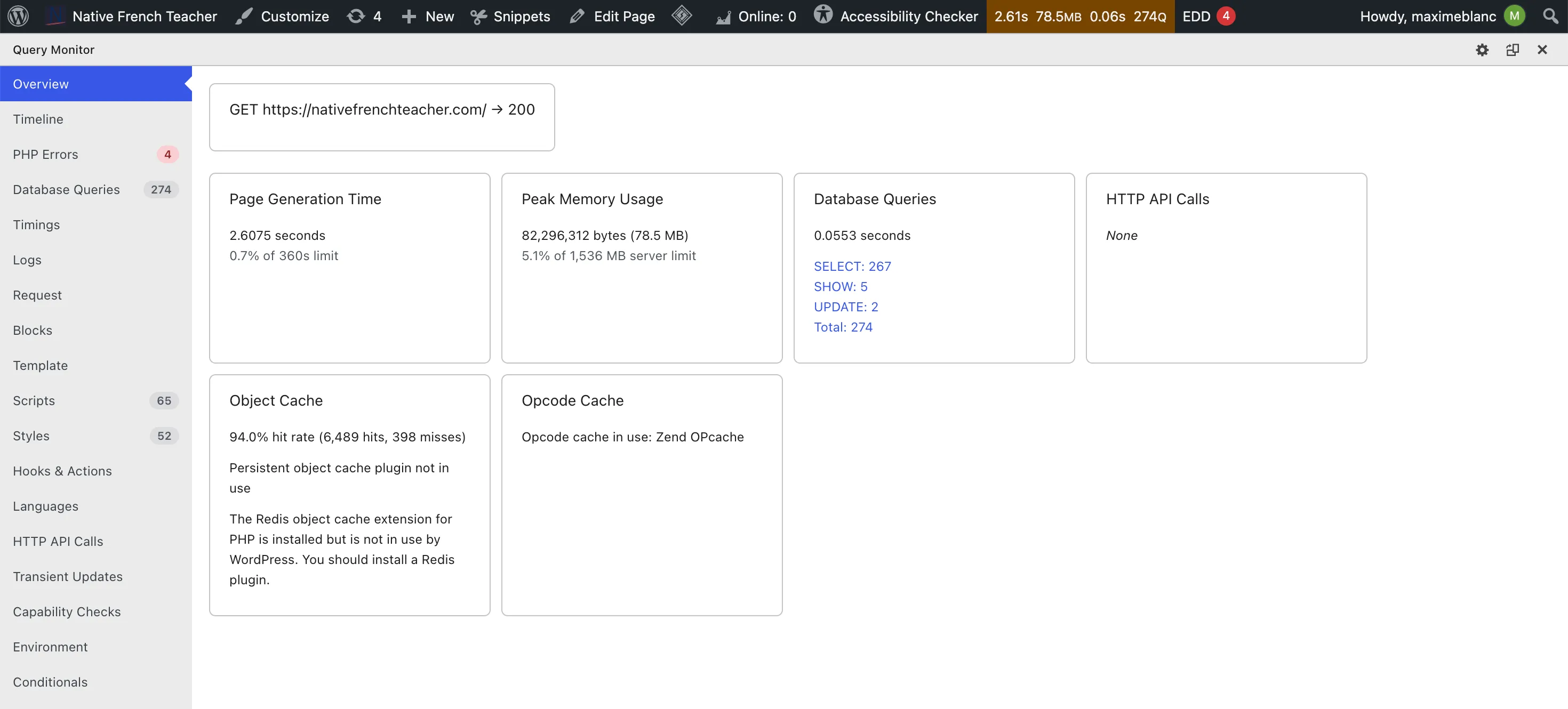
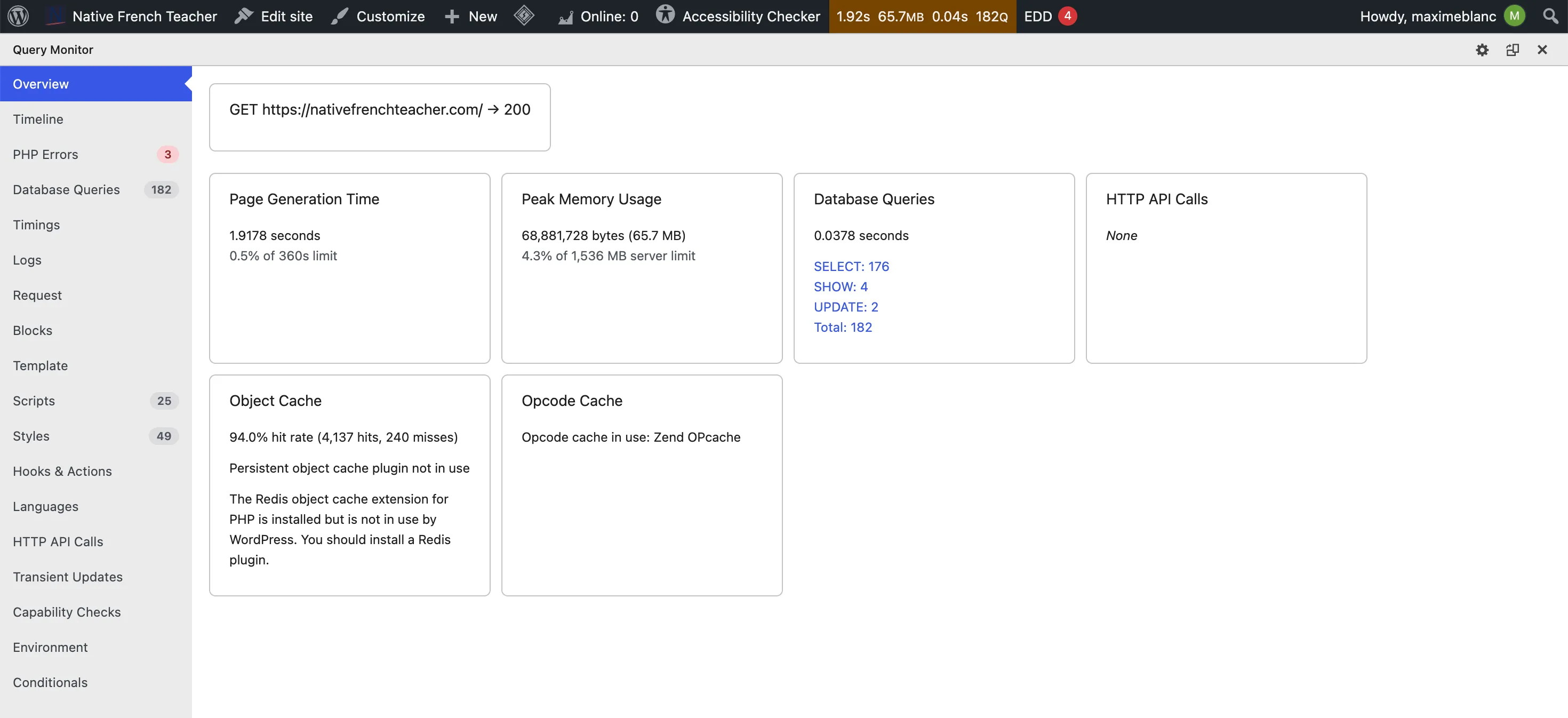
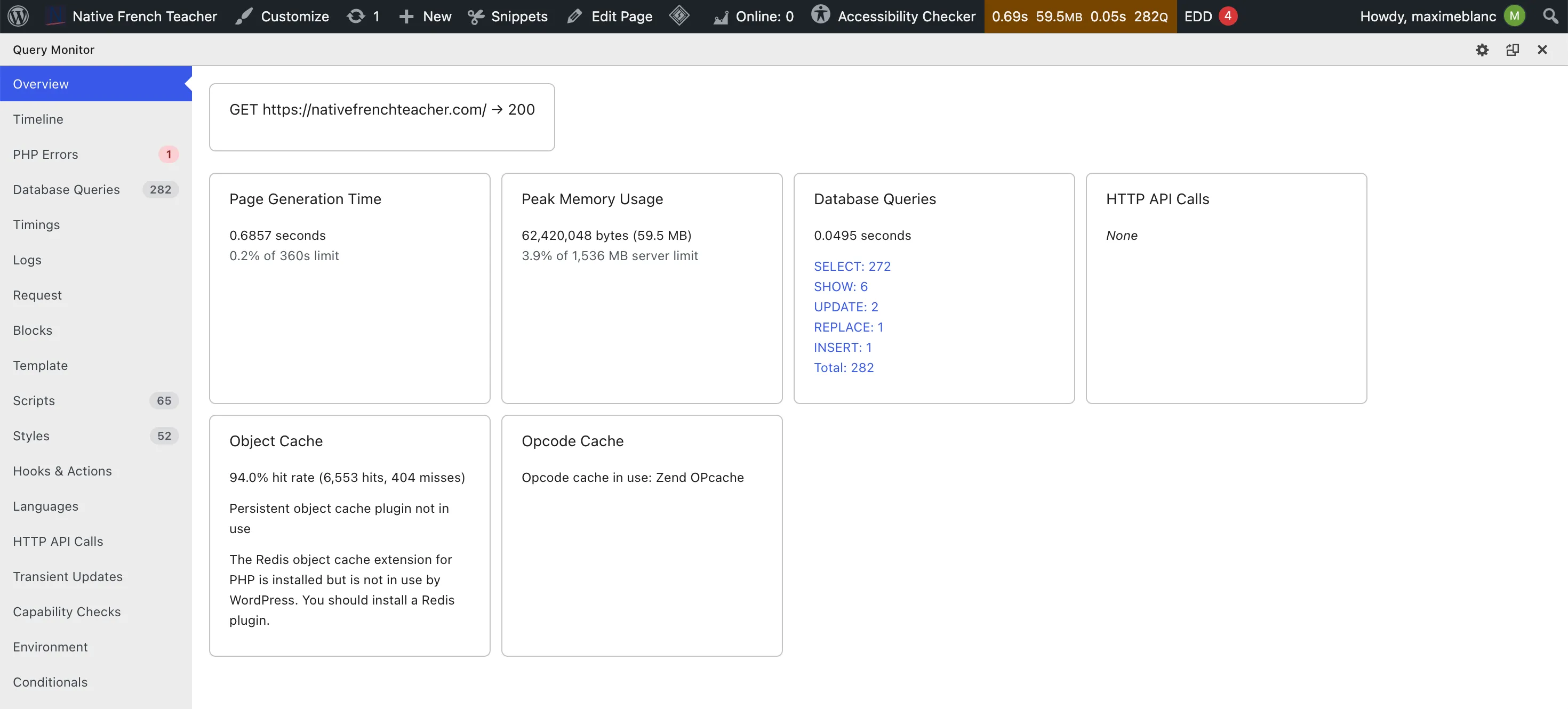
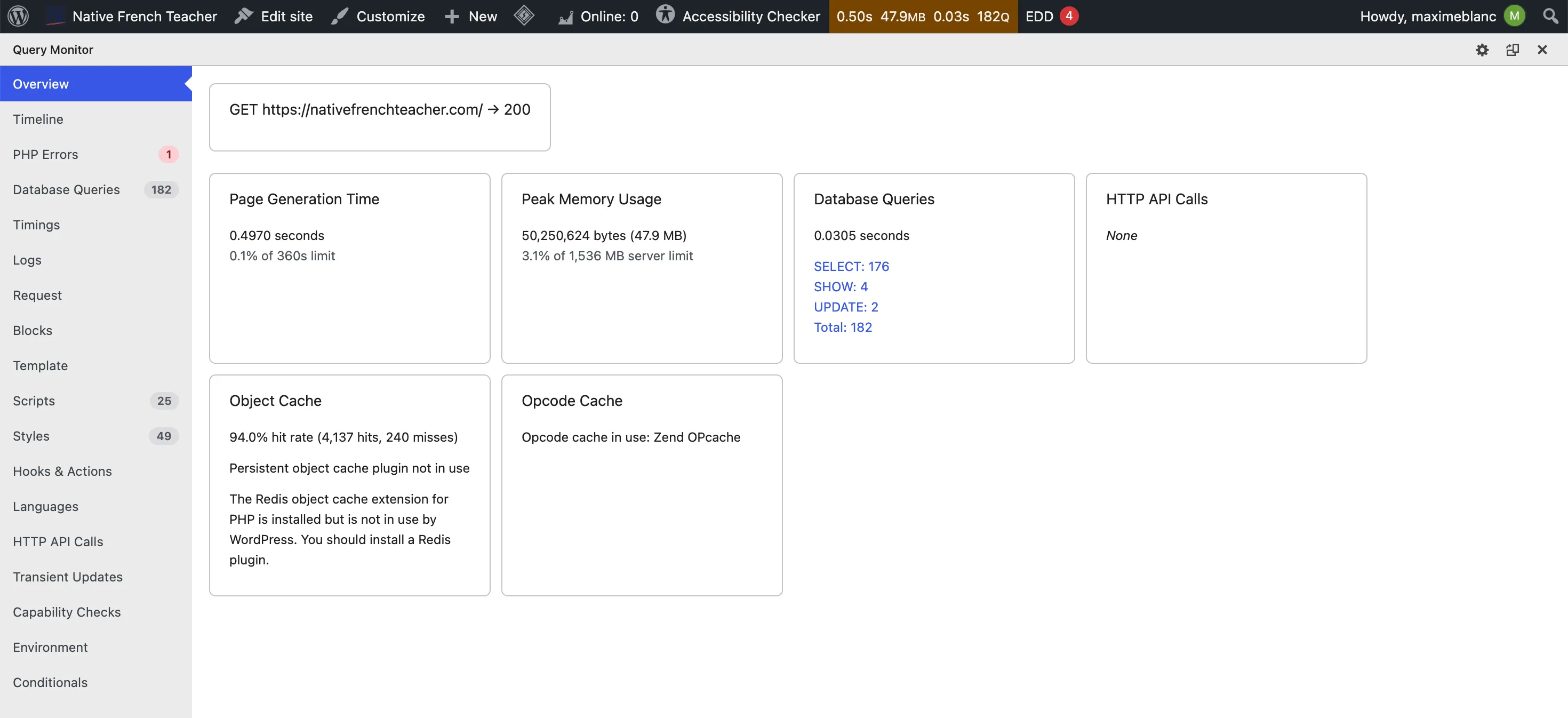
The biggest single number is scripts: 65 down to 25. That’s mostly Astra and Spectra’s own scripts no longer being enqueued. Styles barely moved, because most of them come from plugins (forms, booking, quiz), not from the theme.
Where the time went
Section titled “Where the time went”Query Monitor’s timeline shows how long each WordPress hook took on a warm load.
| Hook | Astra | Twenty Twenty-Five |
|---|---|---|
plugins_loaded |
141 ms | 138 ms |
after_setup_theme |
28 ms | 26 ms |
init |
91 ms | 78 ms |
wp |
32 ms | 6 ms |
template_redirect |
16 ms | 51 ms |
wp_head |
81 ms | 31 ms |
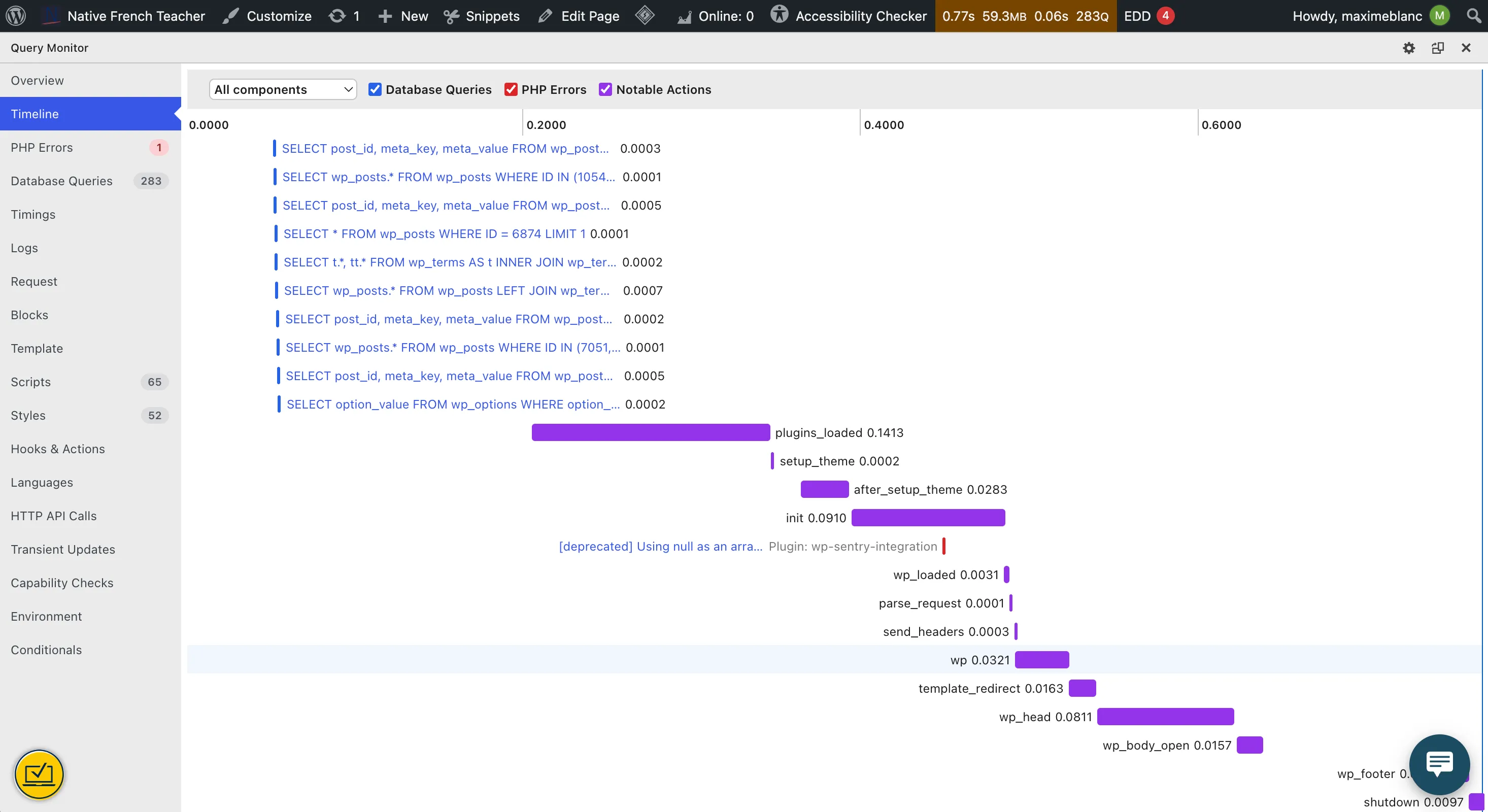
wp_head takes 81 ms.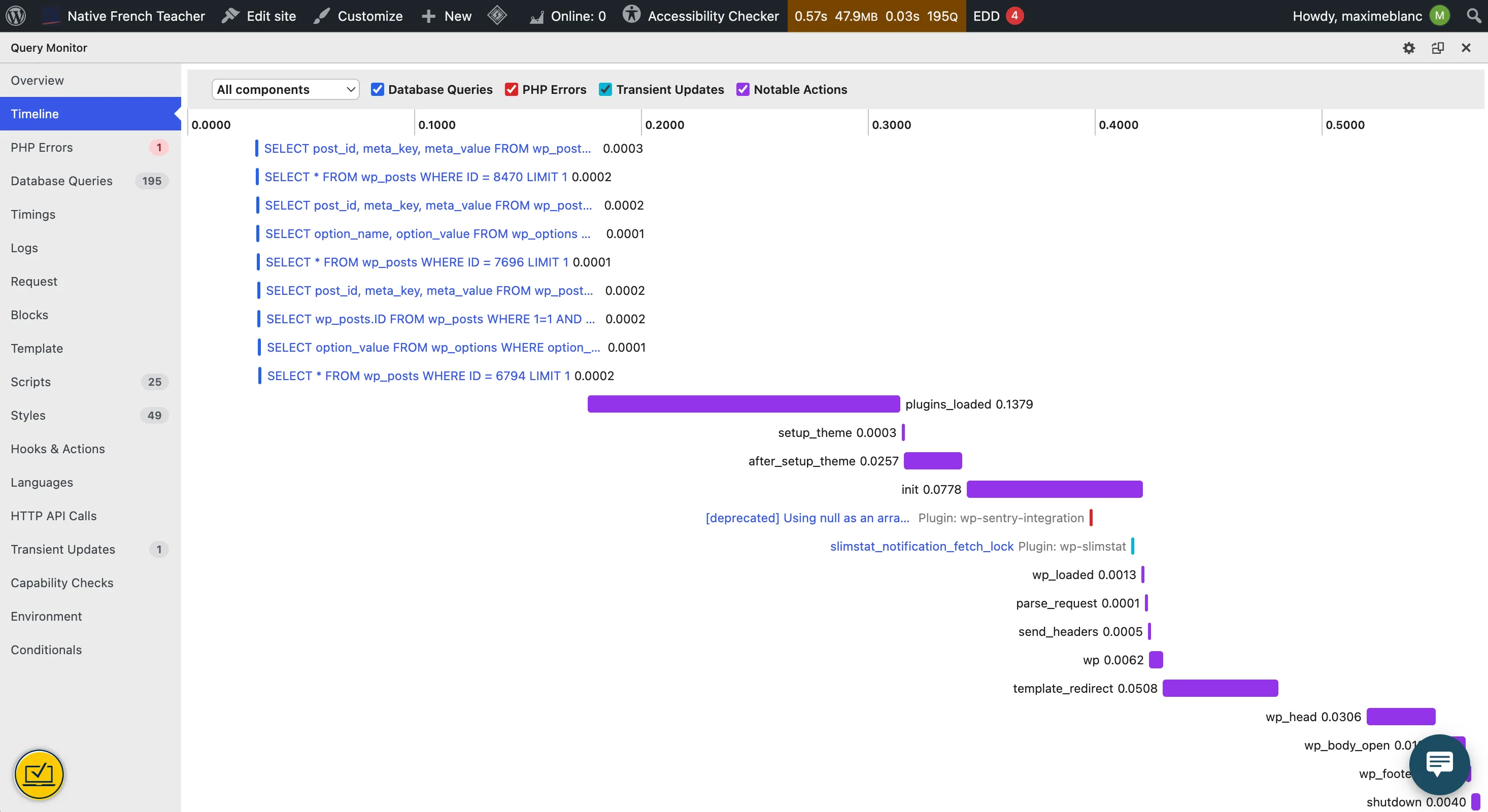
wp_head down to 31 ms, template_redirect up to 51 ms, plugins_loaded unchanged.Three things stand out:
wp_headdropped from 81 ms to 31 ms. Most likely Astra’s dynamic CSS and inline configuration, built at runtime on every request. A block theme ships its styles fromtheme.json, and WordPress only outputs the CSS for blocks actually on the page.template_redirectwent up, from 16 ms to 51 ms. Not everything got faster. Something hooked there now does more work, and it’s on my list to look at with the per-component view.plugins_loadeddidn’t move. At 140 ms it’s the largest single chunk of the request, and changing the theme can’t touch it. The remaining plugin stack is now the thing to optimize, not the theme.
The database got lighter too
Section titled “The database got lighter too”Every WordPress request loads all autoloaded options into memory, whether the page needs them or not. Astra and Spectra stored a lot of their settings that way.
| Astra | Twenty Twenty-Five | |
|---|---|---|
| Autoloaded options size | 1,013 KB (946 options) | 519 KB |
| Big autoloaded options | 3 | 0 |
| Database size | 176 MB | 160 MB |
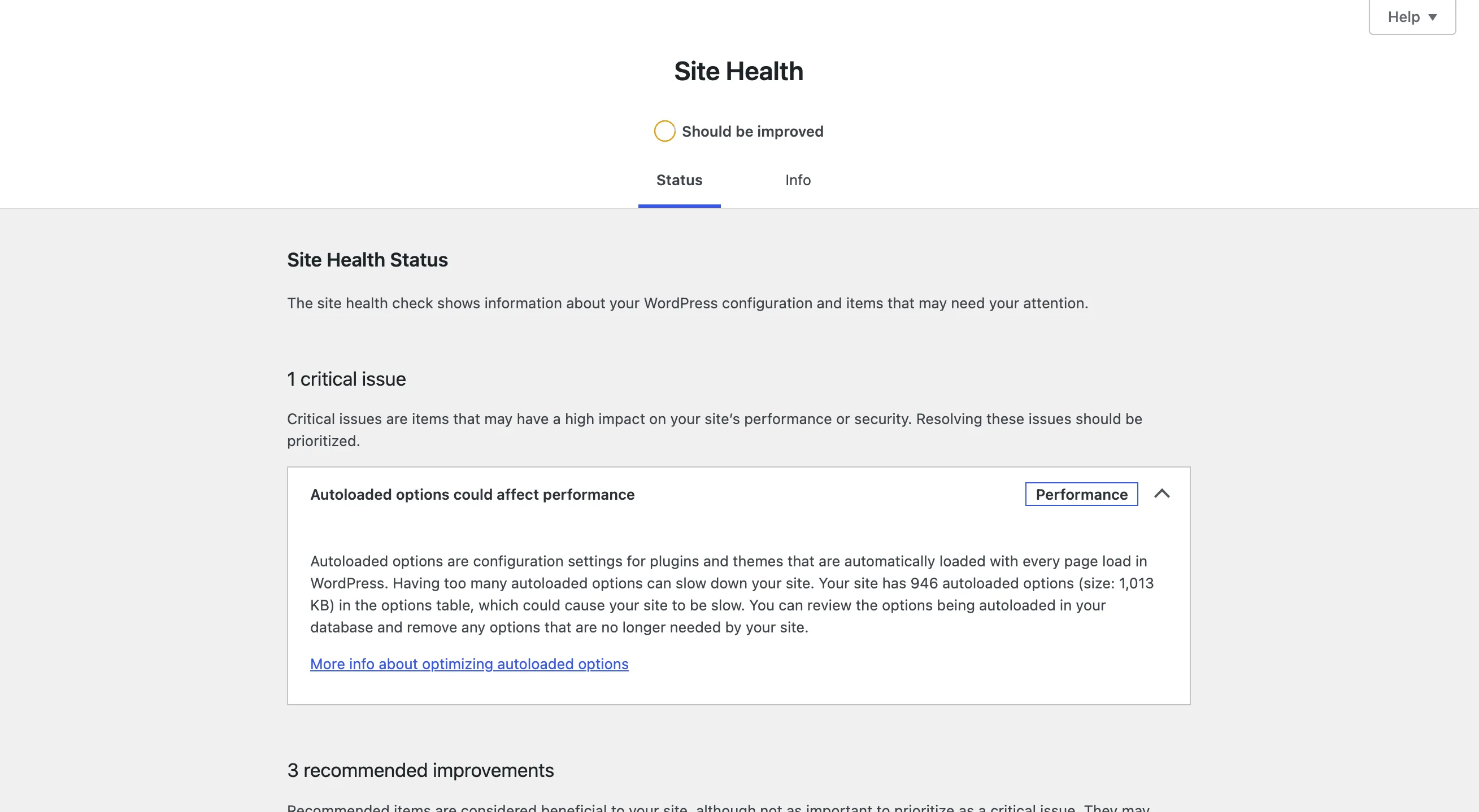
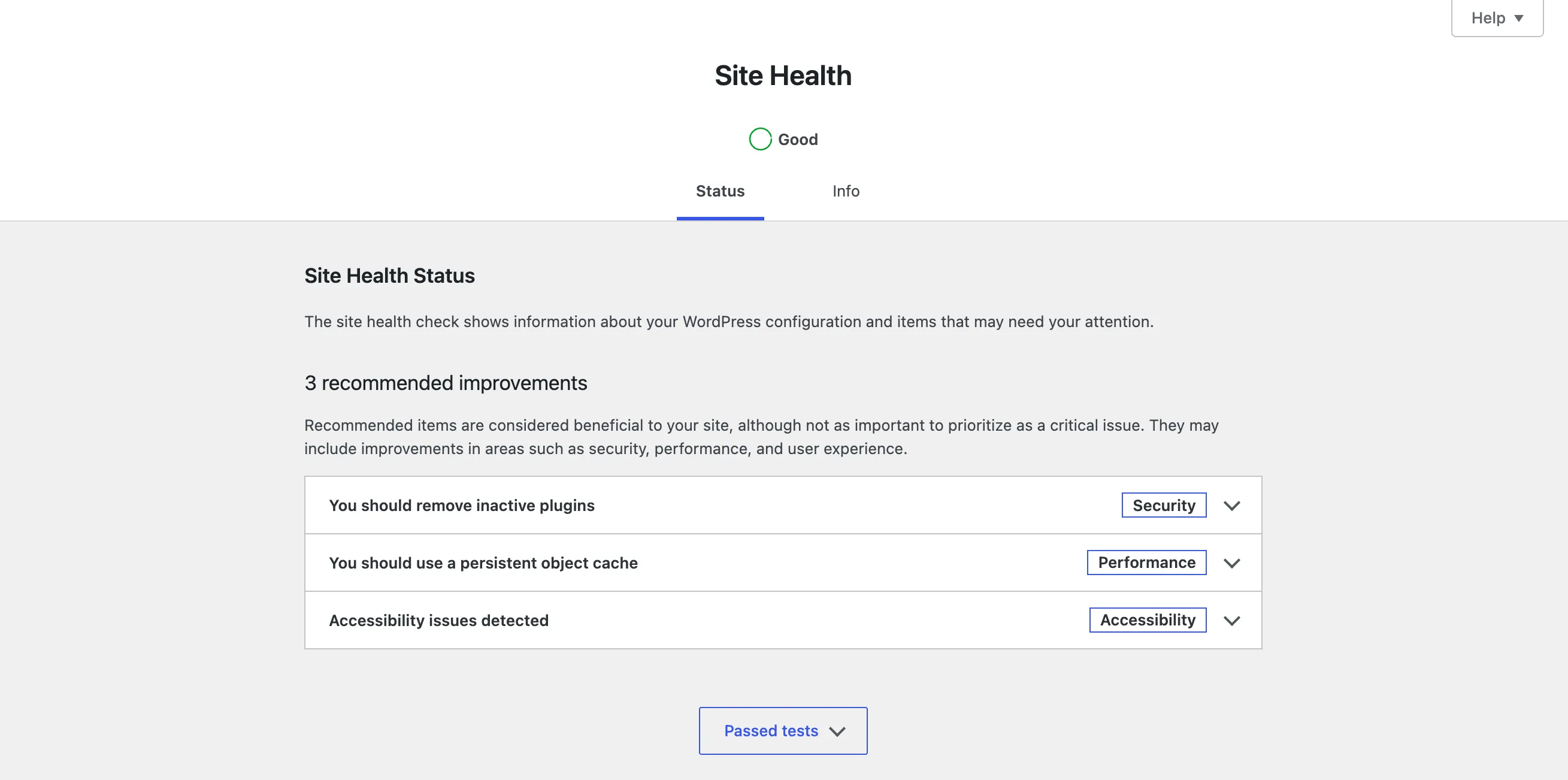
| Site Health | Should be improved, 1 critical issue | Good |
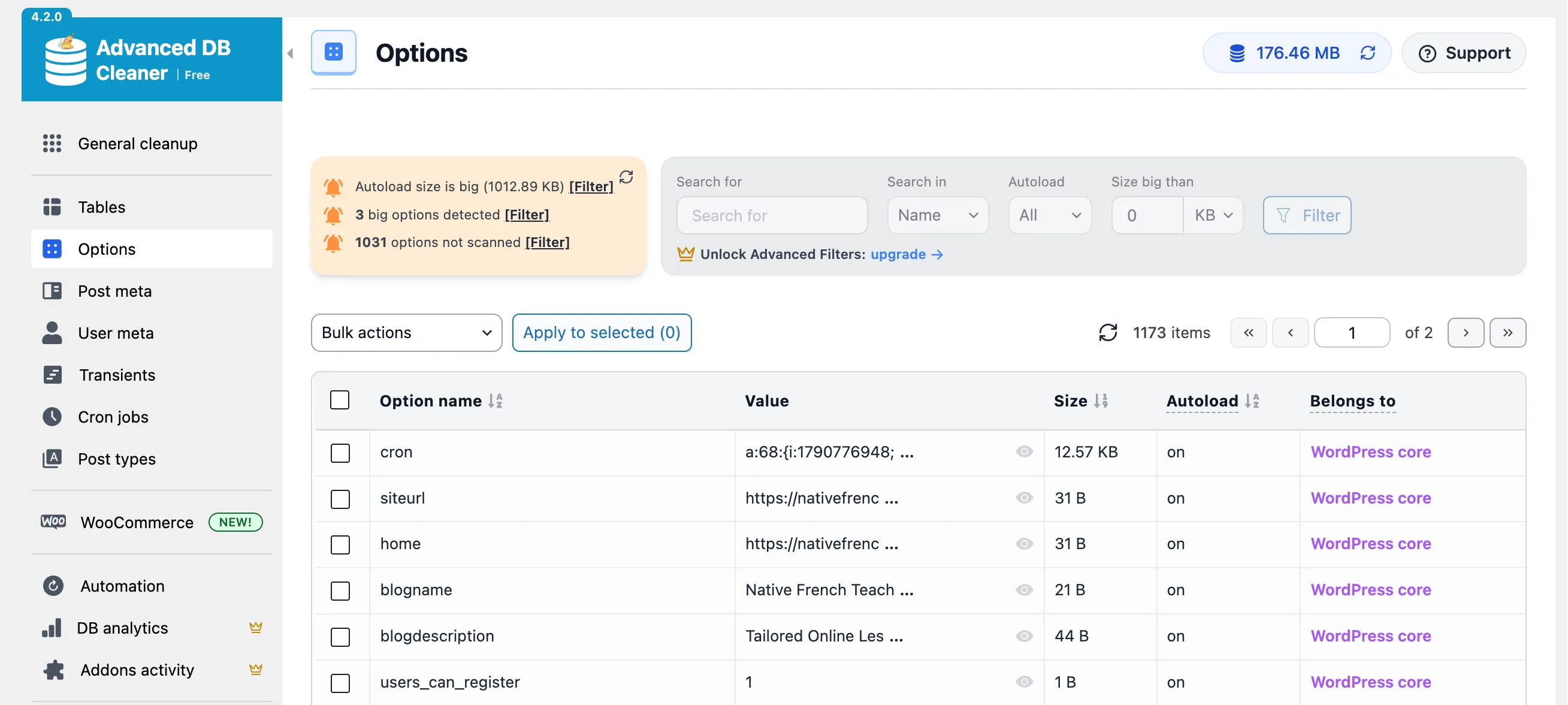
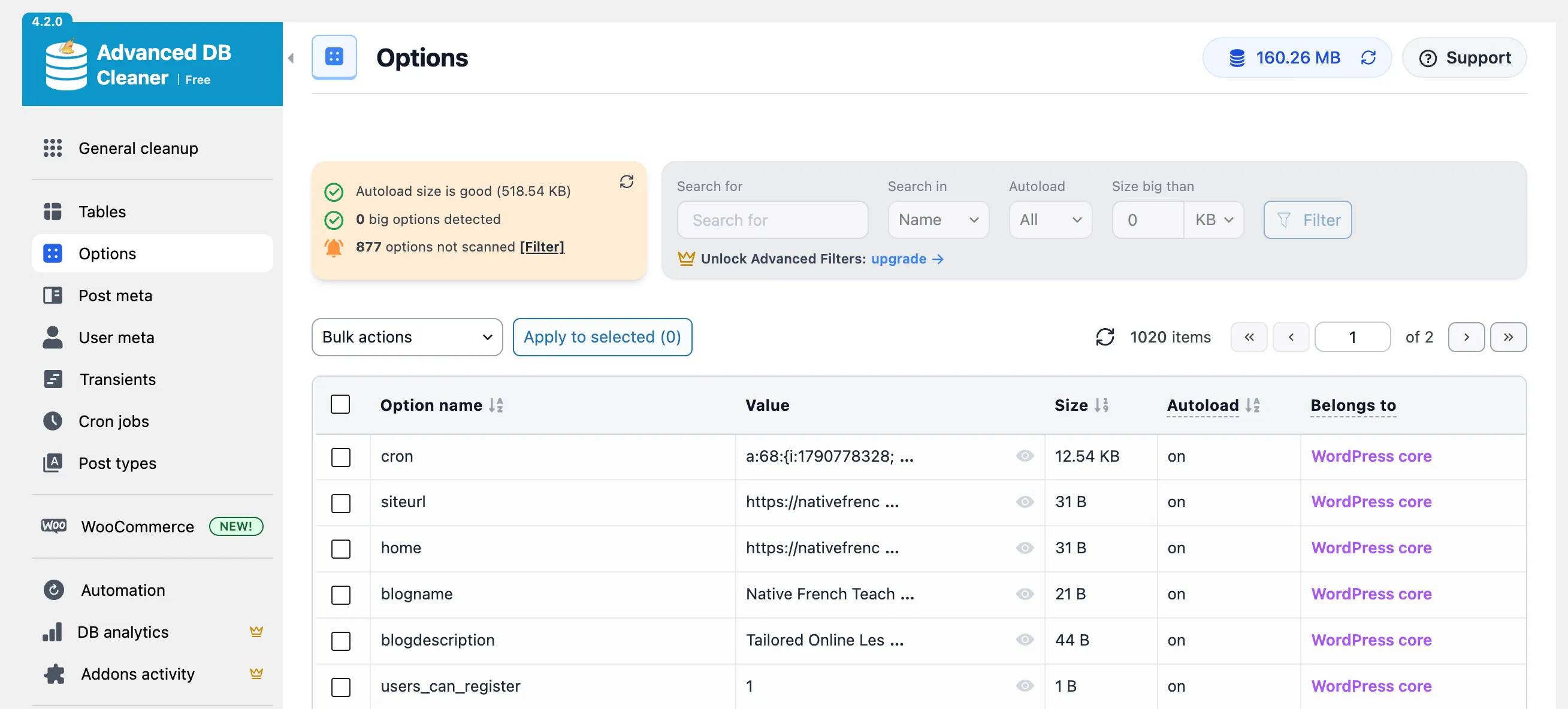
Removing the theme and its companion plugin, then cleaning up what they left behind, halved the autoloaded data. That was also the only critical issue in Site Health (“Autoloaded options could affect performance”), and it’s gone.
What about visitors?
Section titled “What about visitors?”I also ran PageSpeed Insights before and after, and it showed no major change. That’s not surprising: the site sits behind LiteSpeed Cache, and for visitors that’s the real game changer. Most pages are served straight from the cache, so the PHP work measured above rarely runs for them.
So why care about server time at all? Because not every request can be cached:
- Logged-in users. A page cache only works for anonymous visitors. Once someone is logged in, every page they open is rendered by PHP, theme included, which is exactly what the numbers above measure. The site is going to have more logged-in users, so a theme that does less work per page is worth more every month.
- Cache purges. Every purge, including the one after each deploy, means the next visitor gets an uncached page. PHP is usually still warm at that point, so that’s the warm render: 0.69 s on Astra, 0.50 s now.
- Custom API routes. With Loopress you can add API routes to WordPress, and the ones that return personal or changing data can’t be cached. They don’t render a template, but they still boot WordPress, autoloaded options and all.
The cache hides the difference for anonymous visitors today. The lighter stack pays off for everything the cache can’t cover.
Twenty Twenty-Five alone is fast. With Loopress, it’s also manageable
Section titled “Twenty Twenty-Five alone is fast. With Loopress, it’s also manageable”The page is about 30% faster on the server, uses a fifth less memory, runs a third fewer queries and ships 40 fewer scripts. None of it came from a caching plugin or a server upgrade: it came from removing layers.
But a lean theme is only half the story. What made me comfortable dropping Astra is that everything it gave me through panels, Loopress gives me through files:
| What Astra gave me | Twenty Twenty-Five + Loopress |
|---|---|
| Header and footer builder | Template parts as block markup in parts/, pushed into a child theme with lps theme template push. The parent theme stays untouched and keeps its updates. |
| Per-page layout options | Custom page templates in templates/, picked per page with a template: header. A bare landing page is one file. |
| Starter templates and Spectra blocks | Pages written as plain HTML files in the repo, rendered by the theme, locked in wp-admin so Git stays the source of truth. |
Custom code in functions.php or a snippet plugin |
Hooks and snippets as PHP files in Git. |
That split doesn’t take the editor away from my sister. She still writes her blog posts in the WordPress admin, and they live in the database like any other content. What moved to Git is the structure around them: templates, landing pages and code. She now also edits the site from Claude Desktop.
Astra’s features are good, but they live in the database, next to the content, invisible to Git. On Twenty Twenty-Five with Loopress, the same decisions are files: I review them, diff them, push them to staging first, and roll them back when something goes wrong. The server does less work and the design got a history.
That’s the combo I’d pick for the next site: the default block theme for the performance, Loopress for everything Astra used to do in a panel.
Still to do: install a persistent object cache (Redis is on the server, just not wired up) and look at that template_redirect regression.