

WordPress Landing Page in Git: Pattern and Theme Styles
A marketing landing page is the page that gets edited the most and reviewed the least. Someone changes the headline in the page builder, someone else changes the brand color in the Customizer, and a week later nobody can say who changed what, or put it back. When the page is also the one that pays for the campaign, “it looked different yesterday” is a bad place to be.
This recipe ships the whole page as files, with no page builder and no plugin beyond Loopress Full:
- a static page,
pages/landing.html, whose slug is its file name; - a block pattern,
patterns/hero.html, for the hero, referenced from the page so it can change on its own; - the colors and fonts as Global Styles,
theme/<theme>-global-styles.json.
It needs a block theme as the active theme (the examples use Twenty Twenty-Five), the one the Site Editor’s Styles screen works on.
Configure the target environment with lps project config before you run the commands below. The site URL and Application Password are stored on your machine, not in loopress.json. See Concepts.
The project
Section titled “The project”landing-site/ loopress.json pages/ landing.html patterns/ hero.html theme/ twentytwentyfive-global-styles.jsonThe colors and fonts
Section titled “The colors and fonts”Global Styles hold what the brand decides once: a palette and font stacks. The file is named after the active theme (run lps theme style pull once to get the right name) and has the same shape as the settings and styles of a theme.json. The push replaces the theme’s settings and styles for the whole site, not only this page: merge the entries below into the pulled file instead of replacing it, so existing customizations are kept.
{ "settings": { "color": { "palette": [ {"slug": "brand", "name": "Brand", "color": "#1d3557"}, {"slug": "accent", "name": "Accent", "color": "#e63946"}, {"slug": "paper", "name": "Paper", "color": "#f8f5f0"}, {"slug": "ink", "name": "Ink", "color": "#14213d"} ] }, "typography": { "fontFamilies": [ {"slug": "headline", "name": "Headline", "fontFamily": "Georgia, 'Times New Roman', serif"}, {"slug": "body", "name": "Body", "fontFamily": "system-ui, -apple-system, 'Segoe UI', sans-serif"} ] } }, "styles": { "color": {"background": "var(--wp--preset--color--paper)", "text": "var(--wp--preset--color--ink)"}, "typography": {"fontFamily": "var(--wp--preset--font-family--body)"}, "elements": { "heading": {"typography": {"fontFamily": "var(--wp--preset--font-family--headline)"}}, "link": {"color": {"text": "var(--wp--preset--color--accent)"}} } }}Each palette entry becomes a CSS variable (--wp--preset--color--brand) and a set of classes (has-brand-background-color) that blocks can use, in the page and in the editor. The fonts are system stacks on purpose: a web font needs its files, which this file does not carry.
The hero
Section titled “The hero”A pattern file is block markup, optionally opened by a comment header. The file name is the slug, registered as loopress/hero. Its blocks name the palette entries above instead of repeating hex codes, so changing a color in Global Styles changes the hero too.
<!--title: Landing herodescription: Headline, one sentence and a call to action on the brand color.categories: banner, call-to-actionkeywords: hero, landing--><!-- wp:group {"align":"full","backgroundColor":"brand","textColor":"paper","style":{"spacing":{"padding":{"top":"6rem","bottom":"6rem","left":"1.5rem","right":"1.5rem"}}},"layout":{"type":"constrained","contentSize":"720px"}} --><div class="wp-block-group alignfull has-paper-color has-brand-background-color has-text-color has-background" style="padding-top:6rem;padding-right:1.5rem;padding-bottom:6rem;padding-left:1.5rem"><!-- wp:heading {"textAlign":"center","level":1,"fontSize":"xx-large"} --><h1 class="wp-block-heading has-text-align-center has-xx-large-font-size">Ship your site from Git</h1><!-- /wp:heading -->
<!-- wp:paragraph {"align":"center","fontSize":"large"} --><p class="has-text-align-center has-large-font-size">Pages, patterns and styles live in the repository, so every change is reviewed before it goes live.</p><!-- /wp:paragraph -->
<!-- wp:buttons {"layout":{"type":"flex","justifyContent":"center"}} --><div class="wp-block-buttons"><!-- wp:button {"backgroundColor":"accent","textColor":"paper"} --><div class="wp-block-button"><a class="wp-block-button__link has-paper-color has-accent-background-color has-text-color has-background wp-element-button" href="#pricing">See what is included</a></div><!-- /wp:button --></div><!-- /wp:buttons --></div><!-- /wp:group -->
Writing block markup by hand is tedious: build the hero once in the editor, copy its code (Code editor, Ctrl+Shift+Alt+M) into the file, and the file is the source from then on.
The page
Section titled “The page”<!--title: Landingstatus: publishfull-width: truehide-title: true--><!-- wp:pattern {"slug":"loopress/hero"} /--><section class="features" id="pricing" style="max-width:720px;margin:0 auto;padding:3rem 1.5rem"> <h2>Everything in one repository</h2> <ul> <li>A page is a file.</li> <li>The hero is a pattern, edited once.</li> <li>Colors and fonts are Global Styles.</li> </ul></section>status: publishmakes it public,draft(the default) keeps it private until you are ready.full-width: truedrops the theme’s content width so the hero can span the screen, andhide-title: truehides the theme’s own page title, since the page has its own<h1>.<!-- wp:pattern {"slug":"loopress/hero"} /-->is a reference, not a copy: WordPress renders the pattern on every request. Pasting the hero’s blocks into the page instead would freeze a copy that later pattern changes never reach.- Everything below the hero is plain HTML, written as is. The page does not become the front page: only
pages/home.htmldoes.
Deploy
Section titled “Deploy”lps pattern push && lps theme style push && lps page pushPatterns go first, so the page never references one that does not exist yet:
❯ Push hero› Pushed: hero✔ Push heroAll patterns pushed.Pushing Global Styles to http://localhost:8080Pushed: theme/twentytwentyfive-global-styles.json❯ Push landing› Pushed: landing (publish) http://localhost:8080/landing/✔ Push landingAll pages pushed.The page is at the URL the push reports (/landing/ with pretty permalinks, a ?page_id= URL with Plain ones; lps page list shows it), on the desktop and on a phone:
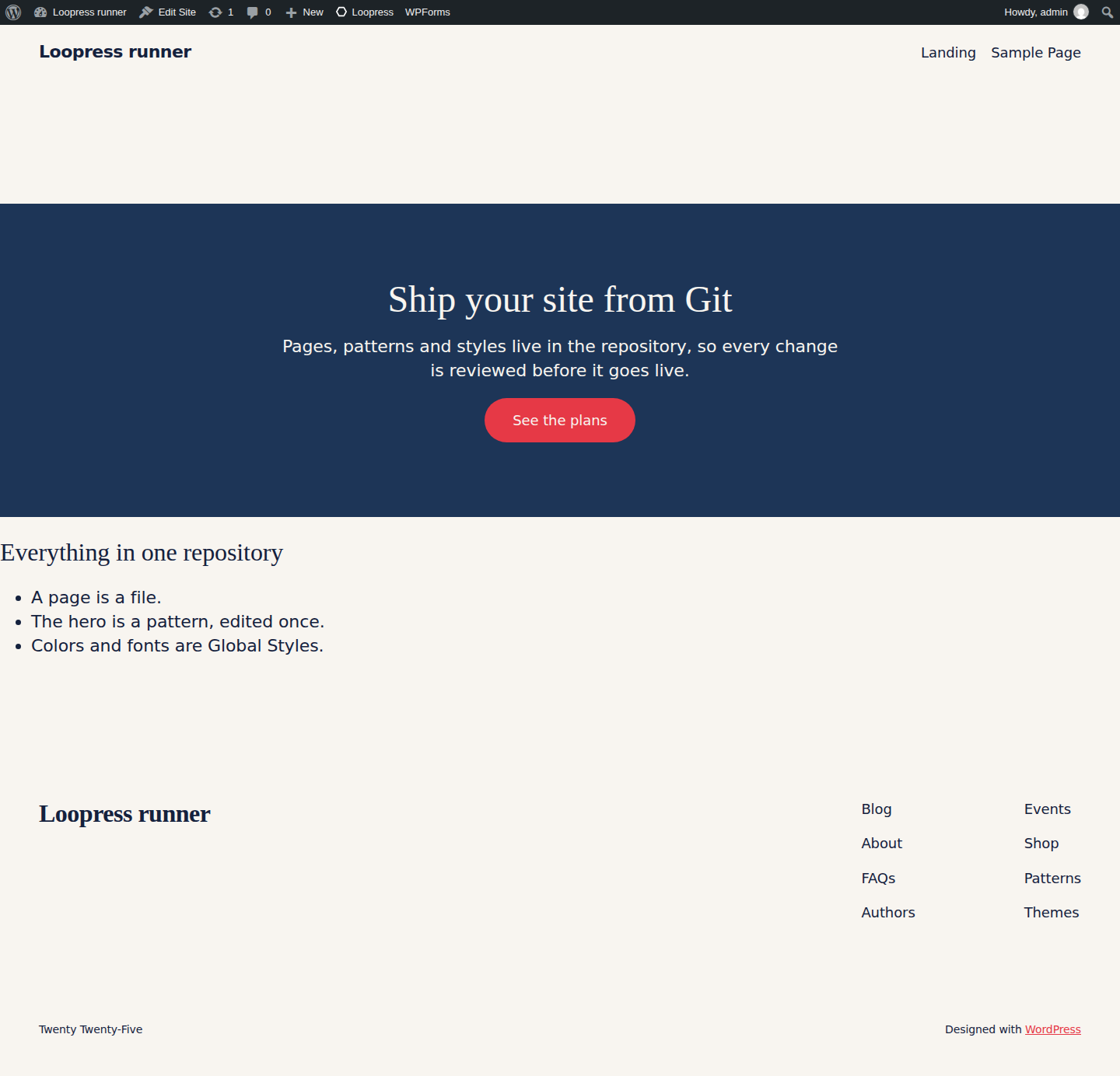
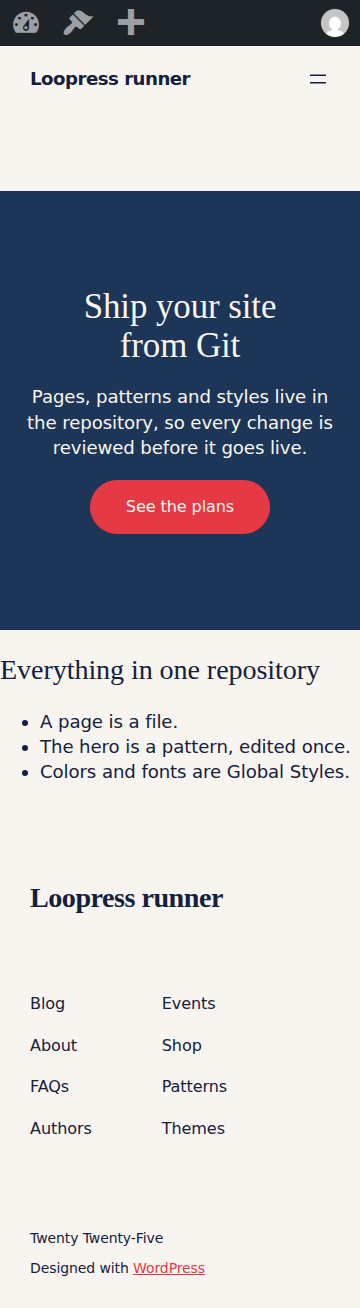
Changing one part
Section titled “Changing one part”The three files are independent, which is the point. Change the headline in patterns/hero.html and run lps pattern push alone: the page shows the new headline on the next request, without being pushed again. Change brand in the palette and run lps theme style push: the hero, and every other block that uses the color, follows.
Once pushed, the page is locked in wp-admin (see Static Pages), so an editor cannot quietly change it: the change goes through a pull request, like the rest of the site.
Related docs
Section titled “Related docs”Loopress Full, a free WordPress plugin and CLI, deploys every resource in this recipe from version-controlled files instead of settings clicked through wp-admin.
Getting Started walks through connecting it to your site in under a minute. lps push covers pushing every resource of a project in one run.